


AC2F Streamline Your Google Drive Workflow
August 19, 2025
2 min

SocialSheet is a Google Sheets add-on that simplifies social media management by enabling users to schedule and publish posts to multiple platforms directly from a Google Sheet. It streamlines workflows, saves time, and improves social media consistency.
Managing social media across multiple platforms can be time-consuming and complex. Manually logging into each platform to create and schedule posts is inefficient and makes it difficult to maintain a consistent brand presence. SocialSheet solves this problem by providing a centralized platform within Google Sheets for scheduling and publishing posts, saving users time and effort.
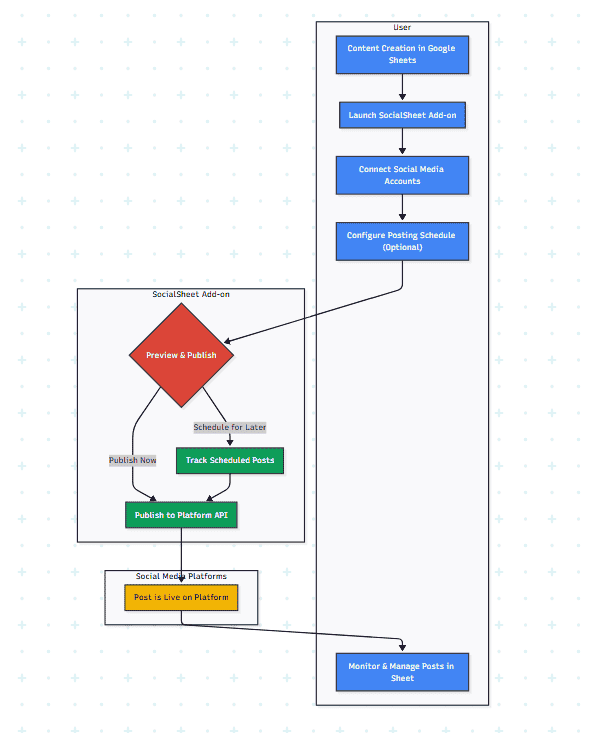
Diagram: Cross-Functional Flowchart for SocialSheet Google Sheets Add-on
Content Creation in Google Sheets: Users prepare their social media posts in a Google Sheet, with columns for message, images/links, scheduled date/time, and platform selection (Facebook, Twitter, LinkedIn, etc.).
Launch SocialSheet Add-on: Users open the SocialSheet sidebar within their Google Sheet.
Connect Social Media Accounts: Users connect their social media accounts for the desired platforms. (This likely involves OAuth authorization.)
Configure Posting Schedule (Optional): Users can schedule posts for specific dates and times.
Preview and Publish: SocialSheet provides a preview of the posts. Users can then publish immediately or schedule them for later.
Monitor and Manage: Users can track their scheduled posts and manage their social media presence directly within the Google Sheet interface.
Google Apps Script: Core development of the add-on.
Google Workspace APIs (Google Sheets API): Integrating with Google Sheets for data management.
Social Media APIs: Integrating with various social media platforms (Facebook, Twitter, LinkedIn, etc.) for posting and scheduling. (List the specific social media platforms supported)
OAuth 2.0: Implementing secure authentication for connecting social media accounts.
UI/UX Design: Designing the user interface of the add-on.
Product Management: Defining features, pricing, and marketing strategies.
Marketing & ASO (App Store Optimization): Promoting the add-on on the Google Workspace Marketplace.
Quick Links
Legal Stuff